
Withdrawing your balance on G555 Game is straightforward once you’ve set it up the first time. The steps below walk you through the whole process, from creating your withdrawal password to sending your first request.
Follow these steps:
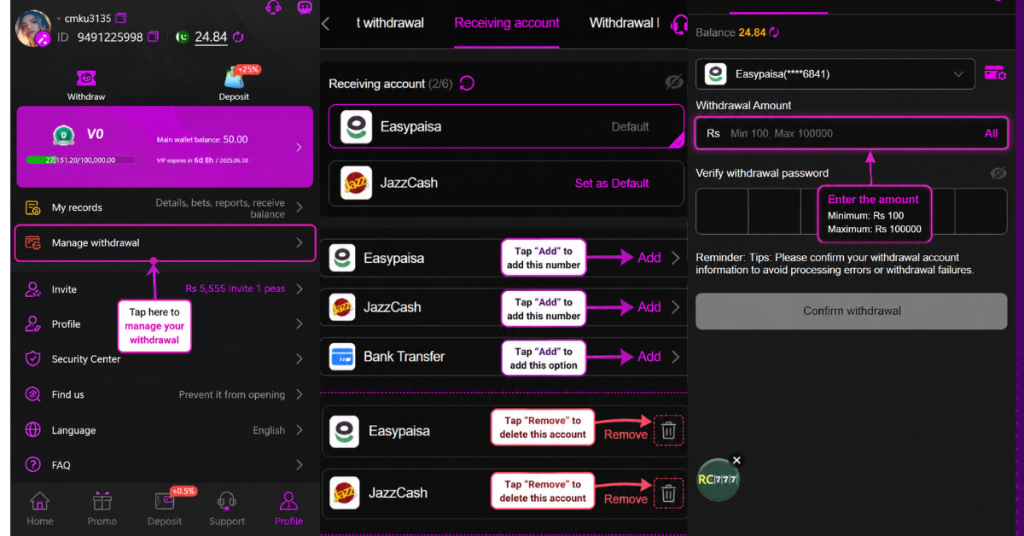
- Open Withdrawal Management. Head to the withdrawal section inside your account.
- Set your withdrawal password. Create your 5-digit withdrawal password. This is separate from your login password and adds an extra layer of security to your payouts.
- Add your payment method. Link the account you want to receive money in EasyPaisa, JazzCash, or a bank account.
- Choose your platform for the request. Select the payment method you want to withdraw to when placing your withdrawal request.
- Withdraw anytime. Once this is set up, every future withdrawal is done from the same place no need to add your details again.
Good to know
- Your account balance must be above 100 to place a withdrawal.
- A wagering requirement applies before you can withdraw, so make sure you’ve met it before placing your request.
Setting the withdrawal password and payment method correctly the first time makes every payout after that quick and hassle-free.